
F28 accounting software for Sri Lankan co-operative societies
F28 is a fully implemented module of SSIPL ERP. It follows the month-end work from the records your society already keeps in the system, shows what is done and what is still open, and prints the F28 report book in Sinhala.
What the F28 module does
Every multi-purpose co-operative society closes its month into the F28 report book. Done by hand, that means chasing branch figures, vouchers, payroll and trip sheets from different desks before anyone can start on the trading accounts.
In SSIPL ERP those records are already in one system. The F28 module lists each month-end task, works out how far it has gone from the data itself, and brings branch transactions, vouchers, payroll and transport into the reports. When every task is complete, you print the whole F28 report book in one go.
How a month reaches the F28 report book
From an outlet's first bill to the printed book. Each step shows whether it happens at the branch, at head office, or automatically.
Outlets record sales and stock
BranchEach outlet bills on its own POS, which keeps selling when the internet drops. Goods received (F16), branch transfers (F18), returns (F19), price changes and stock takings are recorded at the branch.
The branch day reaches head office
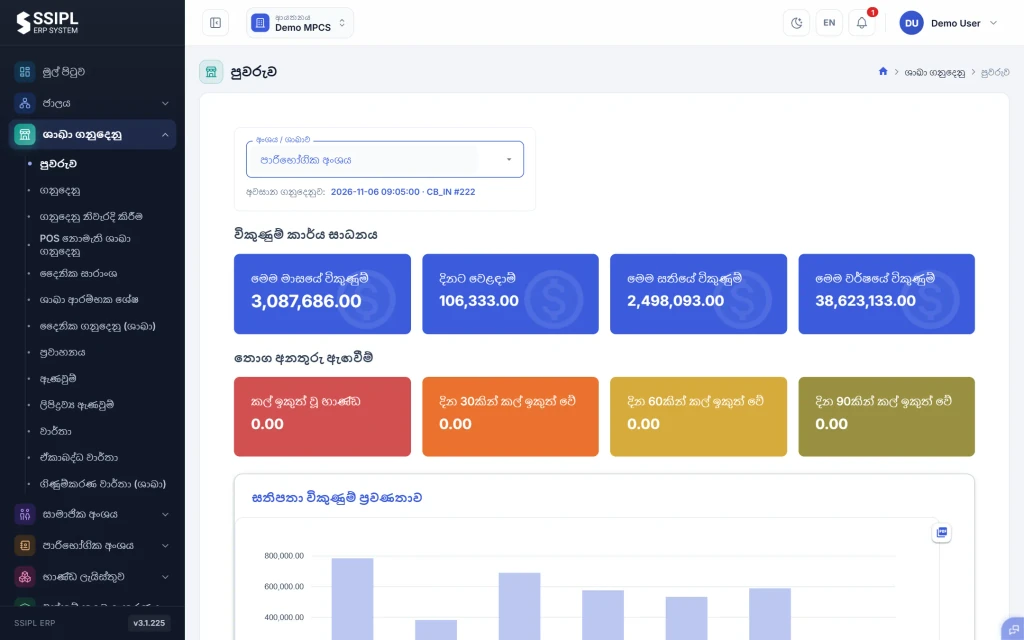
AutomaticWhen the connection is back, the POS sends the day's transactions to head office. Daily F15 stock and F9B sales summaries are produced for every branch.
Head office checks and authorises
Head officeHead office checks each branch transaction, corrects it where needed and authorises it before the day is closed. Every correction records who made it and when.
Vouchers and cash go through approval
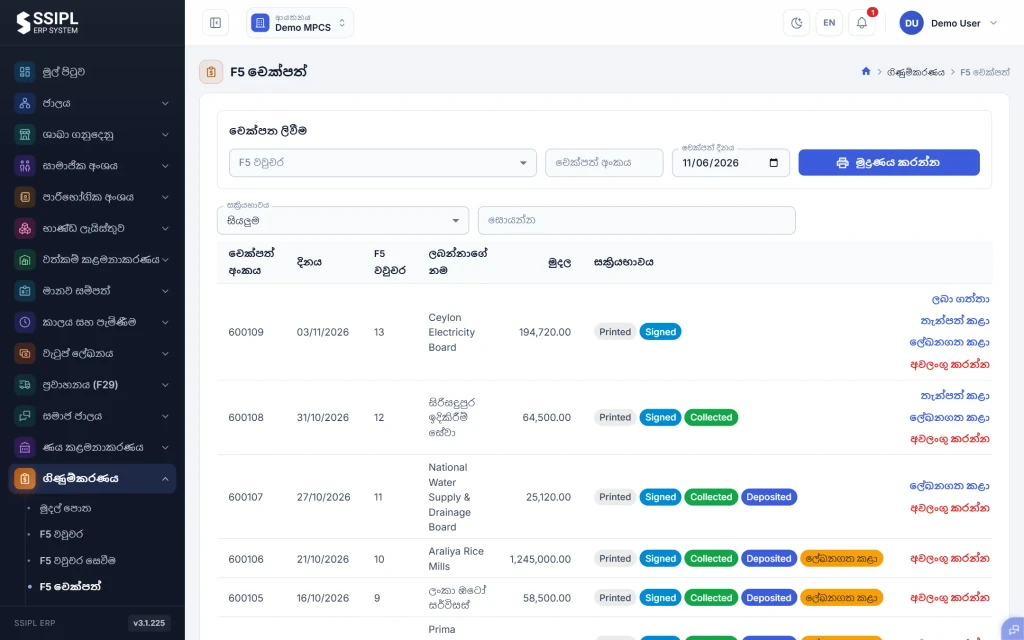
Head officeF5 payment vouchers are approved at four levels before they are paid, and each cheque is tracked from printed to signed, collected, deposited and posted. Cashbook receipts (F10), petty cash (F3) and bank deposits sit in the same books.
Payroll and transport feed in
AutomaticPayroll produces the F5 voucher for each division's salaries, with EPF, ETF and PAYE worked out. Transport adds F29 trip sheets and fuel issues.
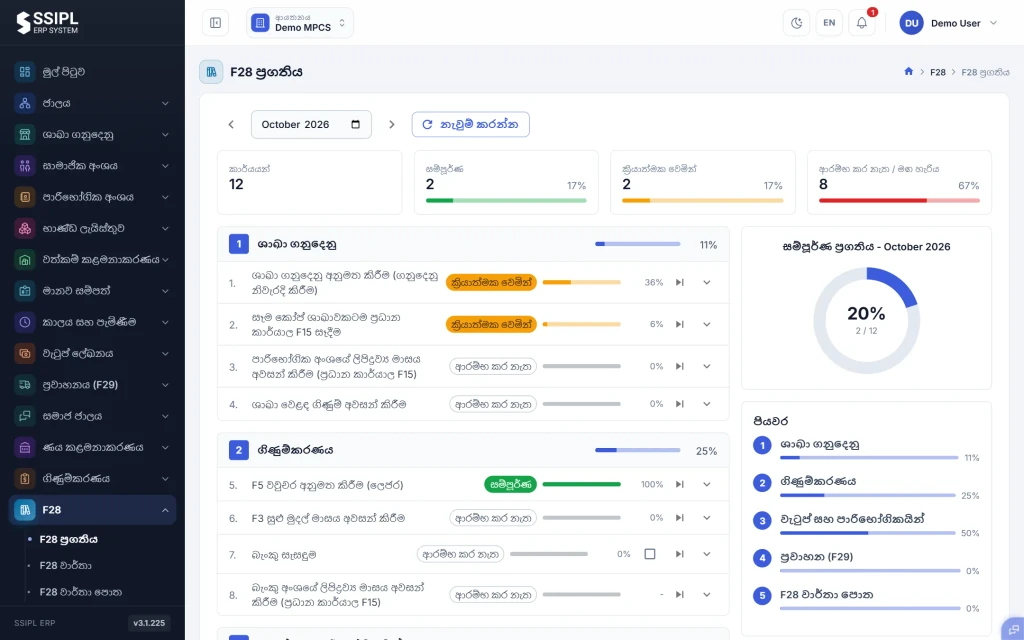
Month-end is tracked in F28
Head officePick the month and the F28 progress screen lists every month-end task by area: branch transactions, accounting, wages and the consumer division, transport (F29) and the report book. Each task shows its status and how far it has gone.
Print the F28 report book
Head officeTrading accounts, expense analysis and the other F28 reports come from the same records. When the tasks are complete, the whole F28 report book prints in one go, in Sinhala.
What the system does, and what your staff check
Done by the system
Branch transactions reach head office as soon as the outlet is back online
Daily F15 stock and F9B sales summaries for every branch
Progress of each month-end task, worked out from the data
EPF, ETF, PAYE, loan recoveries and salary advances in the payroll run
F28 reports and the report book, from the records already in the system
Checked by your staff
Branch transactions: checked, corrected and authorised before the day is closed
F5 payment vouchers: four approval levels before payment
Cheques: printed, signed, collected, deposited and posted, each step recorded
Record amendments and corrections: who prepared, checked and approved them, and when
Closing each area for the month before the report book is printed
Branch and head-office screens
Real SSIPL ERP screens with demo data. The interface is shown in Sinhala; each user can switch to English.
Reports
Produced from the same records the branches and head office already keep.
| Report | What it covers |
|---|---|
| F28 report book | The complete month-end book, printed in one go |
| Trading accounts | From branch sales and stock |
| Expense analysis | From vouchers, payroll and transport |
| F15 stock summary | Daily, for every branch |
| F9B sales summary | Daily, for every branch |
| F5 vouchers and cheques | With approval and cheque status |
| F10 cashbook receipts and F3 petty cash | For the month and any date range |
| F29 trip sheets | Trips, fuel and running cost |
| Date-range reports | By division, ledger, branch and payment mode |
Preparing to choose a system? Use our checklist for testing offline POS and an F28 branch day.
F28 questions from co-operative societies
Is F28 a separate product?
No. F28 is a module of SSIPL ERP. Each society switches on the modules it uses, and F28 reads from the branch, accounting, payroll and transport records in the same system.
How do branch and head-office accounting work together?
Branches record their sales, receipts, transfers and returns. Head office checks, corrects and authorises each branch transaction before the day is closed, then runs vouchers, payroll and the month-end from the same records.
Does F28 connect to the branch POS?
Yes. The branch POS sends its transactions to head office, and branch transactions are the first area tracked on the F28 progress screen. There is no re-keying of branch figures for the month-end.
What happens if an outlet loses its internet connection?
The branch POS keeps billing offline and sends its transactions to head office when the connection is back. The rest of the system runs in a web browser.
Can we move across from our current system?
Tell us what system and records you use today. In the demo we go through what can be brought across and how branch opening balances are set up, before you commit to anything.
How does onboarding and support work?
We set up your divisions, branches, opening balances and user access with you, and train branch and head-office staff. Support is available Monday to Sunday, 7 AM to 10 PM, in Sinhala and English.
Which reports does F28 produce?
The F28 report book, trading accounts, expense analysis and the other F28 reports, alongside daily F15 and F9B summaries, F5 vouchers, cashbook, petty cash and F29 trip sheets.
Which languages does it support?
Each user chooses Sinhala or English. The reports a society files, including the F28 report book, print in Sinhala.
Who can approve and correct entries?
Access is set per user. F5 vouchers go through four approval levels, and every correction or amendment records who prepared, checked and approved it, and when.
See F28 with a society's month
We walk through a branch day and the F28 month-end with sample data of a co-operative society, in Sinhala or English.